WikiCamps NZ vs KiwiCamping: which camping app should you take around New Zealand? KiwiCamping is free to download, needs no account and shows no ads, while WikiCamps NZ costs NZ$7.99, asks you to sign in and shows ads. We make KiwiCamping, so here is how the two compare on the things that matter once you are on the road.
WikiCamps NZ vs KiwiCamping at a glance
If you want the short version: KiwiCamping is the one you can open and use straight away. No sign-in, no ads, DOC's own details for every campsite, hut and track, and a trip you can plan live with your partner.
WikiCamps is owned by G'day Group, the company behind Discovery Parks and G'day Parks. KiwiCamping is independent, and it shows free DOC campsites on the same map as paid holiday parks.
| WikiCamps NZ | KiwiCamping | |
|---|---|---|
| Price | NZ$7.99 | Free to download, with in-app purchases |
| Account | Needed, signed in with an email code | None, nothing to sign into |
| Ads | Yes | None |
| DOC campsites, huts and tracks | Listed by users | Every one, from DOC's own information |
| Several filters at once | Users say places match any | Places must match all |
| Planning with your partner | Share a trip link | Live, with Collaborate |
Sign-in: an account, or nothing at all
Since WikiCamps' big update, you need a WikiCamps account and a code sent to your email to get in. Lots of users say the app then logs them out, and signing back in needs signal you may not have at a campsite.
KiwiCamping simply has no account. Nothing to sign into, no code and no being logged out, so it opens the same way in Haast as it does in Auckland. Your saved places and trips sync privately through your own iCloud.
- WikiCamps NZ: account and email code
- KiwiCamping: no account
- Private iCloud sync
Easy to use: open it and you are on the map
The complaint WikiCamps users make most is that the new version is harder to use than the old one. KiwiCamping keeps the steps few on purpose, so the app gets out of the way of the trip.
You open it and the map of New Zealand is there. Choose a filter, for example Campervans with Hot showers, tap a pin to read the fees, facilities and DOC's notes, and add it to a trip from that same page.
- Opens on the map
- Filter, tap, add
- Details one tap away
DOC campsites, huts and tracks, straight from DOC
In KiwiCamping, every DOC campsite, hut and track comes from the Department of Conservation's own information. Each one shows the fee, whether it is open, whether dogs are allowed, whether you must book and any current alert, with a link to its page on DOC's website.
DOC's freedom camping notices sit on the same map, showing where camping on conservation land is prohibited or restricted. In WikiCamps NZ, DOC places are listed by users, so a fee or a closure changes only when someone updates it.
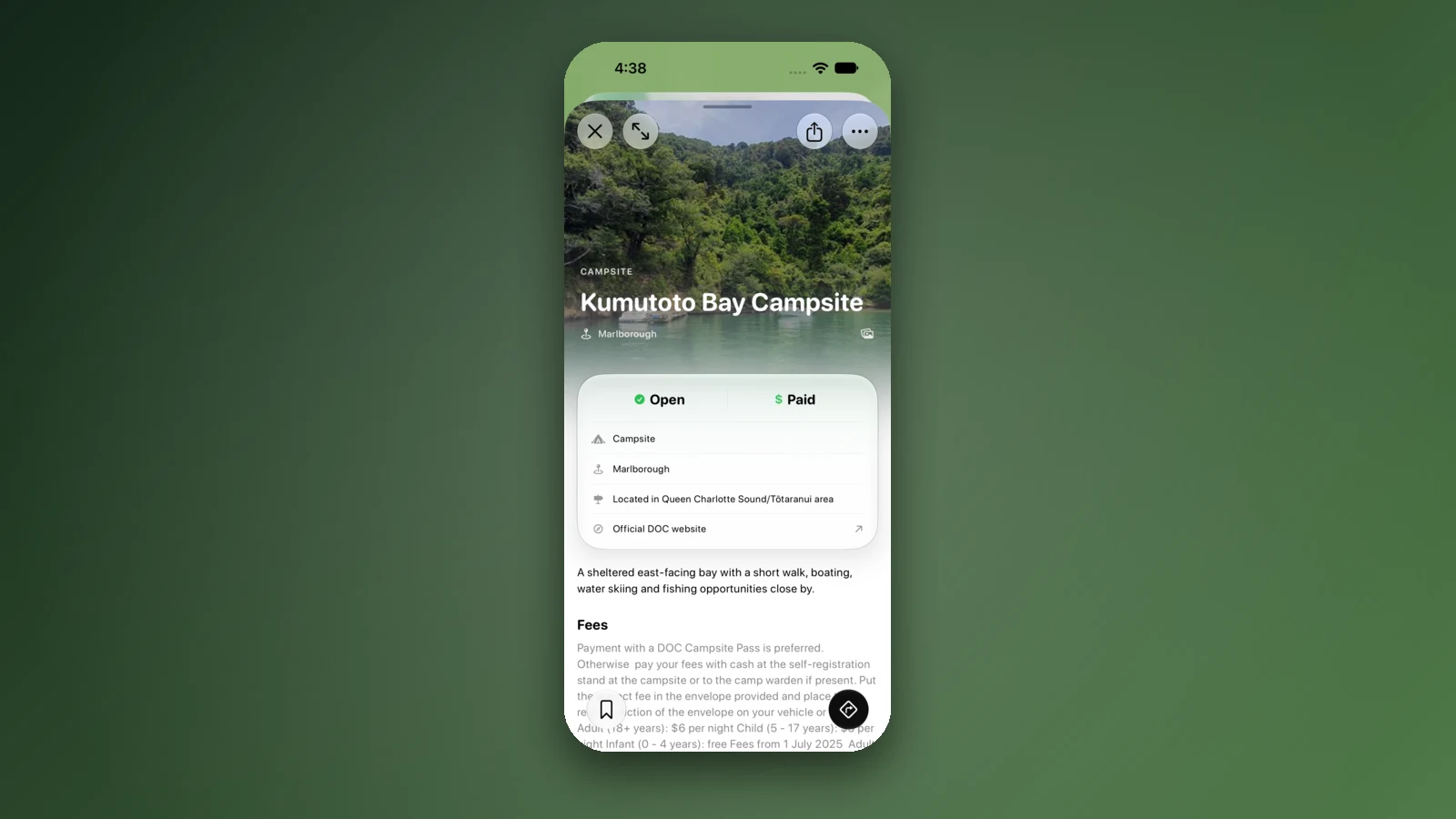
- DOC's fees, dog rules and alerts
- DOC freedom camping notices
- A link to DOC on every place
Filters: Dogs allowed, 4WD access and Caravan access
The three filters campers ask for most have their own Pets and access section in KiwiCamping's filters, right after Cost. Popular features such as toilets, water, showers and Campfires narrow it down further.
Pick several and a place must have all of them. WikiCamps NZ users say choosing several filters there shows places with any of them, which makes for a longer list to sift through.
- Pets and access, right after Cost
- All choices must match
- Cost filter for free DOC sites
Trip planning with Home, any address and your own pins
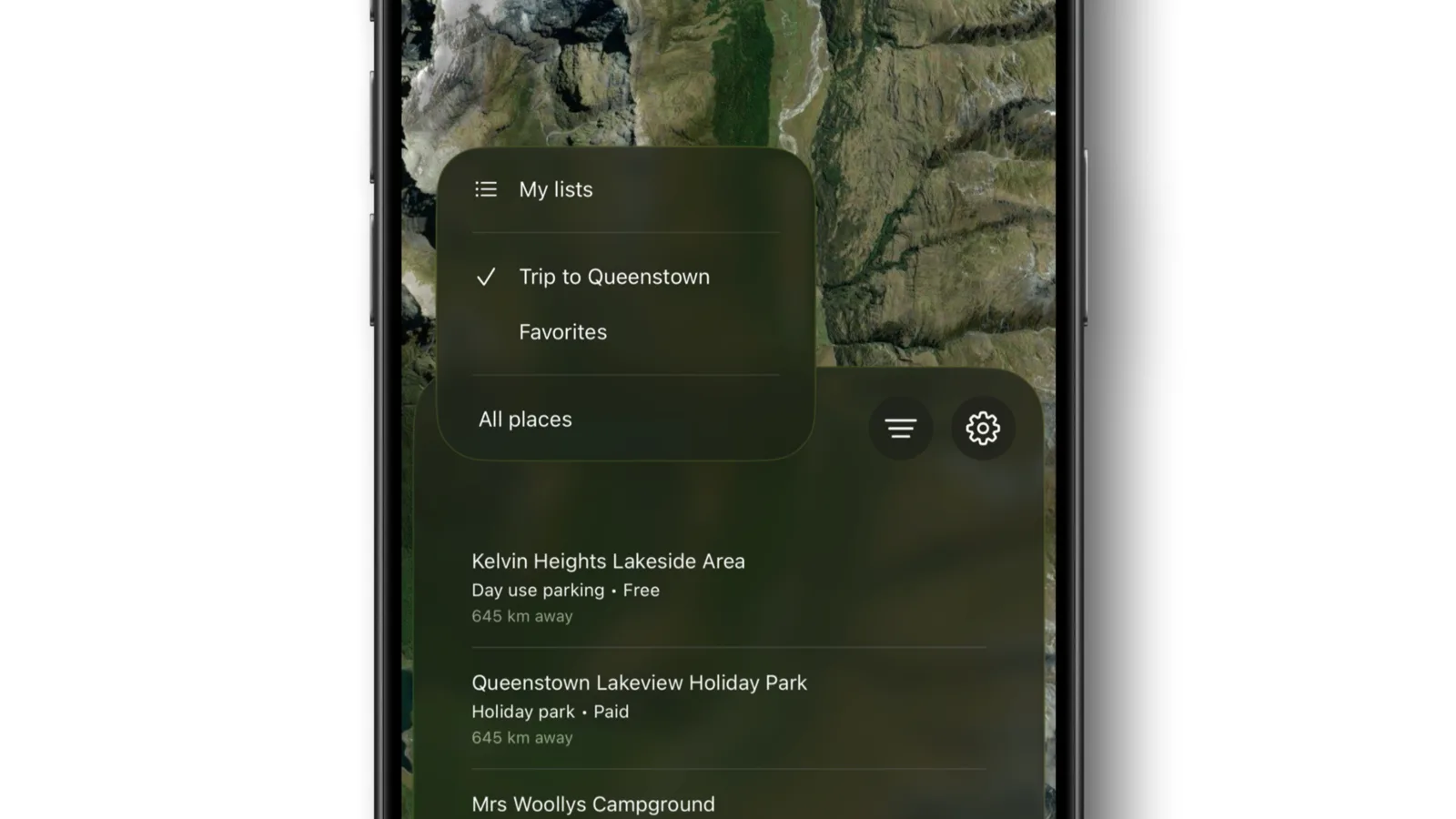
Set your home once in the You tab, then start or finish any trip there in one tap. Add stop finds places in the app, your saved pins, your current location or any street address, so the friend's place in Nelson and the beach you found last summer both fit in. Every stop shows its distance and drive time.
Drop a pin on the map, tap Add to trip, and it joins the route like any other stop. Each stop also has its own dates, notes and weather.
- Start and finish at Home
- Any address or dropped pin
- Distance and drive time per stop
Sharing: plan together live, or send a copy
Tap Share on a trip or a collection and choose Collaborate to invite your partner through iCloud. You both add stops, reorder them, tick them off and edit notes, and the changes appear within seconds, with no account and no login.
Send copy makes a link anyone can open in a web browser to see the stops, dates and notes, which is ideal for family back home. Share as image turns the trip into a picture with the route, stops and nights, and a shared place opens straight in the app for friends who have it.
- Collaborate: one trip, both phones
- Send copy opens in any browser
- Share as image
Why switchers pick KiwiCamping
It is the calmer way to camp in New Zealand: open it, find a spot, go. No ads, no account, DOC's own details, and a trip that two of you can plan at the same time.
The You tab adds a little fun too, with a map that fills in the regions you have visited. KiwiCamping is free to download, with in-app purchases, and our verdict on whether WikiCamps NZ is worth it covers the price question in more detail.
- No ads, no account
- DOC's own details
- Plan together live
Places along the way
Check before you go
Rules and conditions change. Recheck the official source and the page for your exact park or campground before departure.
Common questions
Is KiwiCamping better than WikiCamps NZ?+
For most New Zealand trips, we think so: no account, no ads, DOC's own campsite and hut details, and live trip sharing with your partner.
Does KiwiCamping need an account?+
No. There is no account, password or code, and your own iCloud does the syncing.
Does KiwiCamping show DOC campsites and huts?+
Yes. Every DOC campsite, hut and track is on the map, with DOC's fees, dog rules and booking needs.
Can my partner and I plan a trip together in KiwiCamping?+
Yes. Share the trip and choose Collaborate. You both edit the same trip and see each other's changes within seconds.
Does KiwiCamping work without signal?+
Place details, fees and facilities, plus your saved places and trips, stay on your phone, so you can read them without signal.