A New Zealand road trip is planned around three things a general map app handles badly: where you will sleep each night, how long the next leg really takes on winding two-lane roads, and what you can still read when the signal drops on the West Coast. We compared six planner apps on those questions using their current New Zealand App Store listings and their developers' own help pages, checked on 20 October 2026. Because we build KiwiCamping, it is listed first; the reasons are specific to camping trips, and for other kinds of trip we say plainly which planner to use instead.
The verdict in two sentences
For a camping or campervan trip, plan in KiwiCamping, because the places to sleep come from DOC's own data and the plan keeps dates, notes and to-dos on each stop; then let Google Maps or Apple Maps do the turn-by-turn driving. If you are planning with a group, mixing hotels and flights, or want a free planner with no stop limit, Wanderlog is the stronger choice.
Whatever you plan in, check the NZ Transport Agency's Journeys site for closures on the morning you drive. Slips, snow and roadworks can close passes such as Arthur's Pass and the Haast, and NZTA is the official source on whether a state highway is open.
| App | Best for | Price | Multi-stop routes | Without signal | NZ rating |
|---|---|---|---|---|---|
| KiwiCamping | Camping road trips by the night | Free; Pass NZ$3.99 to NZ$12.99 for trips | Ordered stops with dates and distance | Place details yes, map tiles no | 3.8 (4) |
| Wanderlog | Group trips, budgets, hotels and flights | Free; Pro from NZ$27.99 a month | Unlimited stops, route optimisation | Plans saved offline | 4.9 (707) |
| Google Maps | Turn-by-turn driving | Free | Up to 9 stops per route | Downloaded areas | 4.7 (73,470) |
| WikiCamps New Zealand | Campsites plus fuel estimates | NZ$7.99 upfront (iPhone) | Trip planner with stops and notes | Up to three planned trips | 4.5 (137) |
| Apple Maps | Driving on iPhone | Free, built in | Multi-stop driving | Downloaded maps | Built into iPhone |
| Polarsteps | Recording the trip as you go | Free; Plus NZ$14.99 a month or NZ$49.99 a year | Itinerary and route tracking | Not stated | 4.9 (2,985) |
1. KiwiCamping: best for planning a camping trip night by night
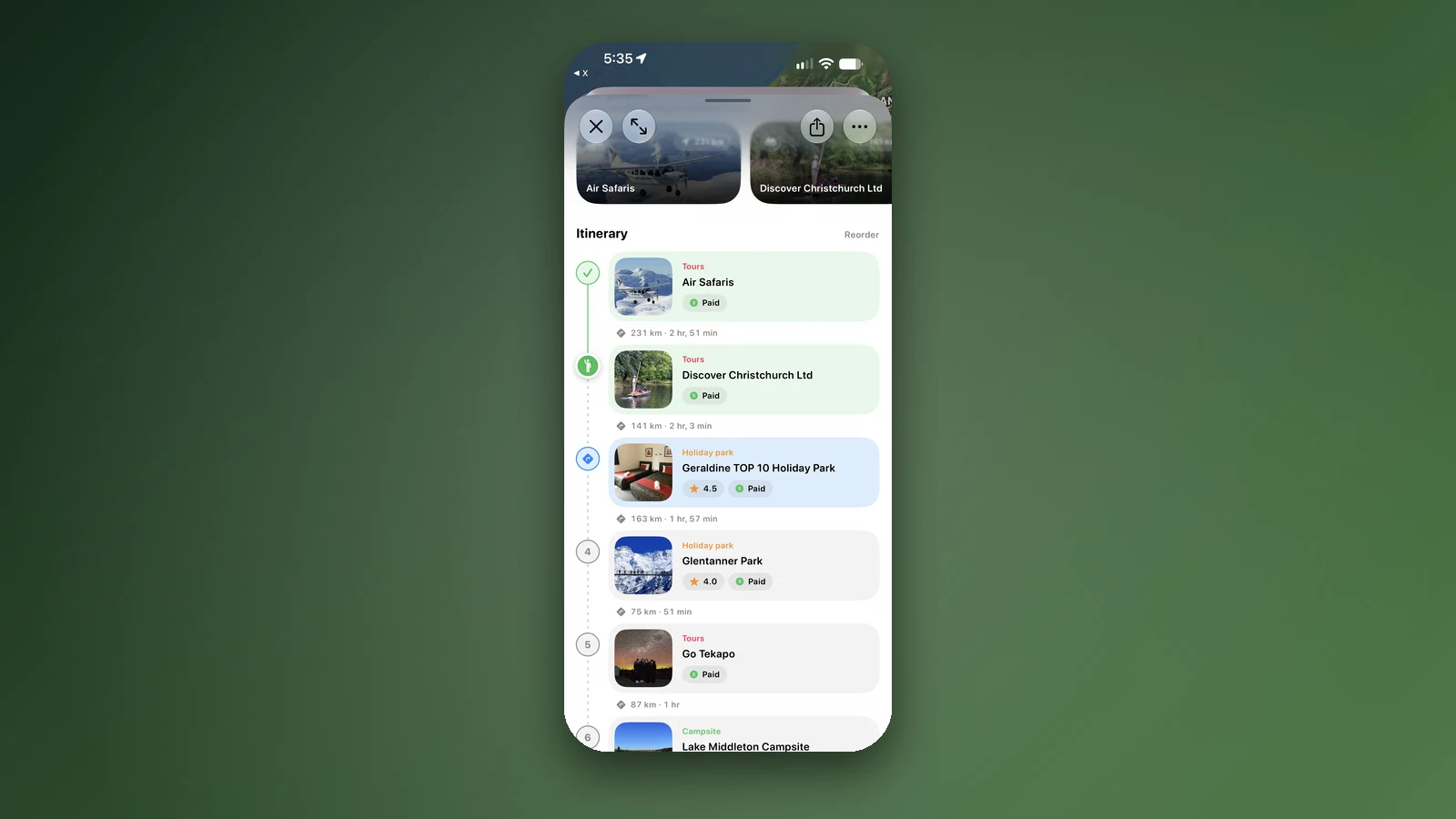
KiwiCamping treats a trip as a list of nights, not just a line on a map. You save places into collections as you research and add the ones you choose to a trip, ordered, with dates, a note on each stop for gate codes or arrival windows, a to-do list for fuel, water and groceries, the total route distance and how much of the trip you have visited. Trip dates can be added to your Calendar, and the itinerary can be shared as text.
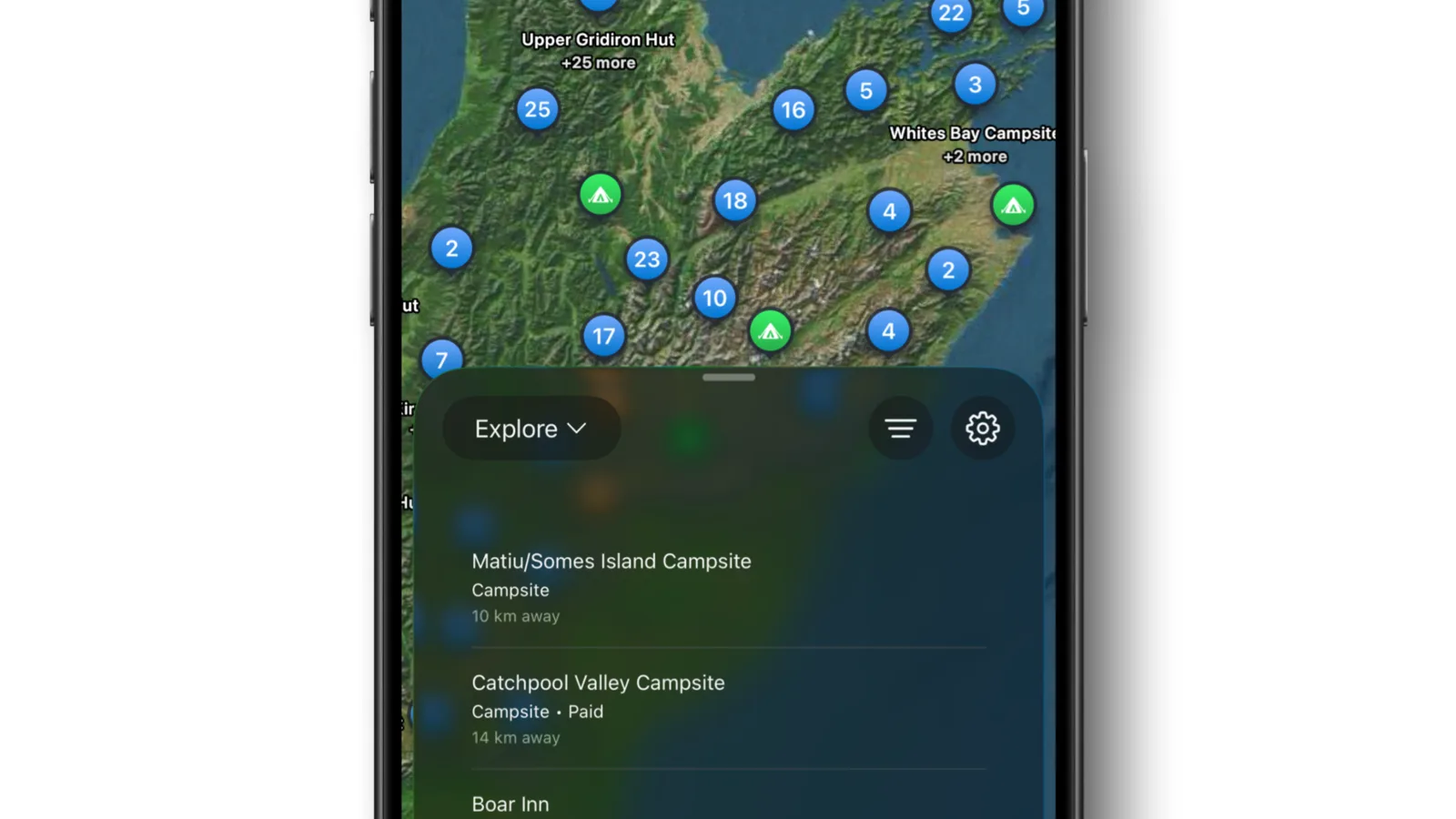
The places to sleep are the reason it comes first for this kind of trip. In its August 2026 data the app carried 287 DOC campsites, 927 DOC huts and 1,453 DOC tracks, with the fees, dog rules and booking requirements DOC publishes, where it publishes them. Those details stay on the phone, so you can still compare tonight's options with no reception; map tiles, routing, weather and photos need signal.
The limits: collections, trips and the DOC places all need the KiwiCamping Pass, listed from NZ$3.99 to NZ$12.99 on the New Zealand App Store; only BookIt stays and tours are free. It is iPhone only with iOS 26 or later, it is for New Zealand alone, it does not optimise the order of stops for you, and it had 4 New Zealand ratings (3.8).
- Best for: nights, not just driving
- Pass needed for collections and trips
- Hand turn-by-turn to a maps app
2. Wanderlog: best for planning with other people
Wanderlog is a general travel planner with a 4.9 rating from 707 New Zealand ratings. Its listing describes an itinerary on a map in visiting order, drag-to-reorder, times, notes and links, unlimited road-trip stops for free, route optimisation with travel time and distance per day, real-time collaboration, budgeting and bill splitting, and plans saved for use offline.
Pro costs NZ$27.99 a month on the New Zealand App Store, with annual options listed too, and adds export to Google Maps among other features. It has no dedicated New Zealand camping layer, so check DOC campsite fees, dog rules and booking details on DOC's site.
- Best for: groups, budgets, mixed trips
- Unlimited stops free
- Check DOC details on DOC's site
3. Google Maps: best for the drive itself
Google Maps is the default for turn-by-turn navigation, rated 4.7 from 73,470 New Zealand ratings. Its directions take up to 9 stops including the destination, which covers a day or two of driving rather than a fortnight, and it has no days, notes or budget in the route itself.
Download offline areas before you leave a main centre. Google's help pages say offline driving directions only work when the whole route is inside a downloaded area, and offline mode has no traffic or alternative routes, so download generously along the corridor you are driving.
- Best for: navigation
- 9 stops per route
- Download areas along the whole route
4. WikiCamps New Zealand: best for campsites with a fuel estimate
WikiCamps New Zealand costs NZ$7.99 once on the App Store and combines its user-built database of more than 12,000 New Zealand sites with a trip planner. Its site describes adding stops, notes, custom pins and routes, an estimate of fuel spend, and offline access to up to three planned trips.
It is the closest like-for-like alternative to KiwiCamping for a camping trip. The difference is the data: WikiCamps' listings are added and kept up to date by its community of users, while KiwiCamping's DOC places come from DOC's published data. It rated 4.5 from 137 on the New Zealand App Store.
- Best for: campsite planning, paid once
- Fuel spend estimate
- Offline for up to three trips
5. Apple Maps: best if you want nothing extra on an iPhone
Apple Maps comes with every iPhone, supports multi-stop driving routes and can download maps for use without signal. For a traveller who only needs the drive from one stop to the next, it does the job without another download.
Like Google Maps, it is a navigator rather than a trip planner: a multi-stop drive has no nights, dates or to-dos, notes go on saved places rather than on the drive, and it is not available on Android.
- Best for: simple iPhone navigation
- Download maps before remote legs
- No trip dates or to-dos
6. Polarsteps: best for recording the trip
Polarsteps is mainly a travel journal that tracks your route automatically and builds a map of where you have been, with an itinerary planner in its listing. It rated 4.9 from 2,985 New Zealand ratings and offers Plus at NZ$14.99 a month or NZ$49.99 a year.
It is a good companion for sharing the trip with family at home. It is not built around campsites or driving times, so pair it with a planner and a navigator.
- Best for: a shareable record of the trip
- Plus is optional
- Pair it with a planner
Check NZTA Journeys before every long drive
The NZ Transport Agency's Journeys site shows state highway closures, roadworks, traffic cameras and holiday traffic predictions, and a free My Journeys account emails you about the routes you save. It is a website, not an app, and it is the authority on whether the road is open.
If your route crosses Cook Strait, book the ferry with Interislander or Bluebridge first and build the days around the sailing, because the ferry is the one leg you cannot move by an hour.
- NZTA Journeys for closures
- Book the Cook Strait ferry first
- Recheck on the morning you drive
How we chose and checked
We compared apps New Zealand travellers use to plan a driving trip, on 20 October 2026, from each New Zealand App Store listing and the developers' own help pages. Roadtrippers is left out because its New Zealand listing says it is designed for the United States and Canada, and TripIt because it organises bookings rather than routes.
Ratings, prices and stop limits are as listed that day. We describe features only as their developers do, so a feature not mentioned here is not a claim that an app lacks it.
Places along the way
Check before you go
Rules and conditions change. Recheck the official source and the page for your exact park or campground before departure.
Common questions
What is the best road trip planner app for New Zealand?+
For a camping or campervan trip we recommend KiwiCamping, which we make, because it plans by the night with DOC campsites and huts built in; use Google Maps or Apple Maps for the driving. For group trips or trips mixing hotels and flights, Wanderlog is the stronger planner.
Can Google Maps plan a multi-stop road trip in New Zealand?+
Yes, up to 9 stops including the destination in one route, which suits a day or two rather than a whole trip. Download offline areas along the full route, because offline directions only work inside them.

Try it yourself
See how it fits your trip.
Free to download. BookIt holiday parks and tours are free to browse and book; DOC campsites, huts, dump stations, the in-app guides and trip planning need the Premium pass.
KiwiCamping is an iPhone app. There is no Android version.